Hi,
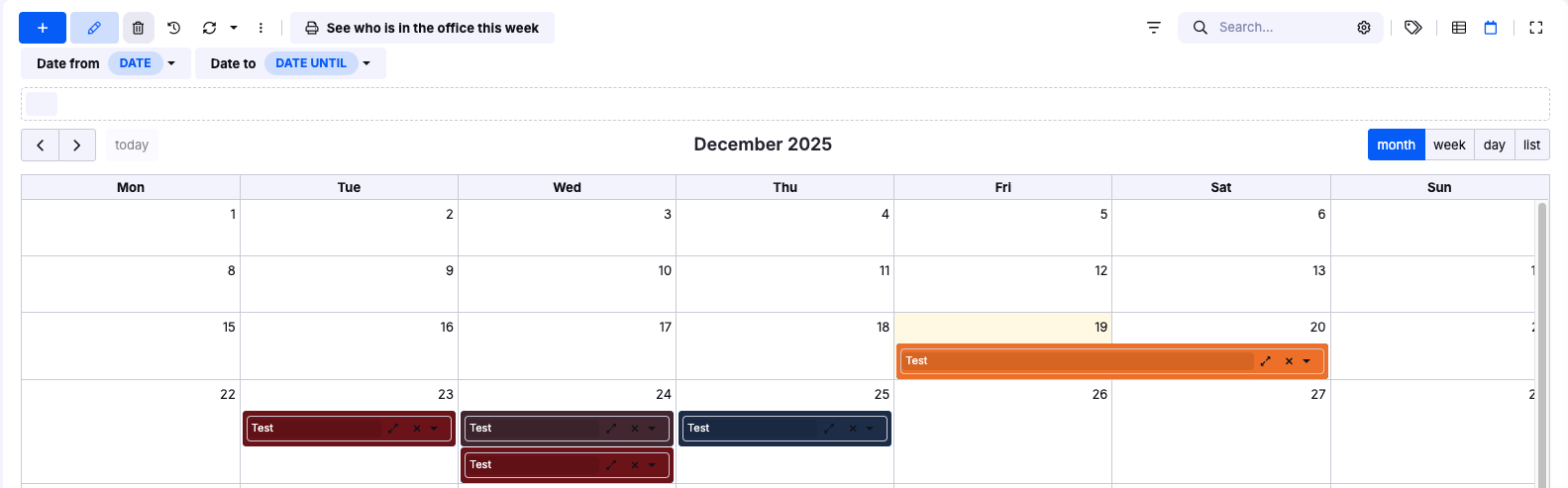
I am experiencing a visual issue in the Calendar view. Above the calendar grid, an empty box is displayed even though I have removed all advanced filters and view settings. This box is related to a dropdown (picklist) field from my form.
After I select any value from that picklist and save the record, the box appears above the calendar. I have already tried the following:
Disabled Show in record description for the field (link to table, edit form header, record audit)
Hidden the field in the table view
Despite this, the box still appears (now empty), and it can be dragged and dropped within the calendar, which interferes with normal calendar usage.
the calendar view works in a following way: it will take the two values in fields Date from and Date to and places the record into the calendar view between those two days. However when there is a record without values in those two date fields, the application has nowhere to place the record into the calendar view. Therefore it will appear above the grid and user can drag it into the day later (which effectively fills in the Date from field).
So the reason why you see the empty square above the table is because there is a record without the Date and Date until. And it is empty because there is also no value in the field that has enabled the Show in record description property.
You can prevent this for example by making the Date and Date until required fields, so no user will save the record without the date values and it will always appear correctly in the calendar view.
Hello Anna,
thank you for your reply. Unfortunately we cant make the fields mandatory as we have two different dates (one time and recurring) and user selects which will fill out.
.
Issue is if we select recurring starts and end and repeats on - save it. New records are created but at the same time empty square is displayed. If user drag the square they can create duplicates. Is this expected behaviour?